You've got eight hours of user interviews, a recorded webinar, or a library of lectures sitting on your drive. The information may be valuable, but finding the few minutes that matter can take almost as long as watching everything. An AI video summarizer promises to turn that backlog into something you can scan, search, and act on.
The promise is real, but incomplete. A useful summary depends on more than a fast transcript or an impressive demo. Messy audio, missing visual context, privacy policies, and misleading benchmark scores can all change whether the output is safe to trust. The right way to evaluate these tools is to understand what they do, where they fail, and whether their outputs match the job you need done.
What an AI Video Summarizer Actually Does
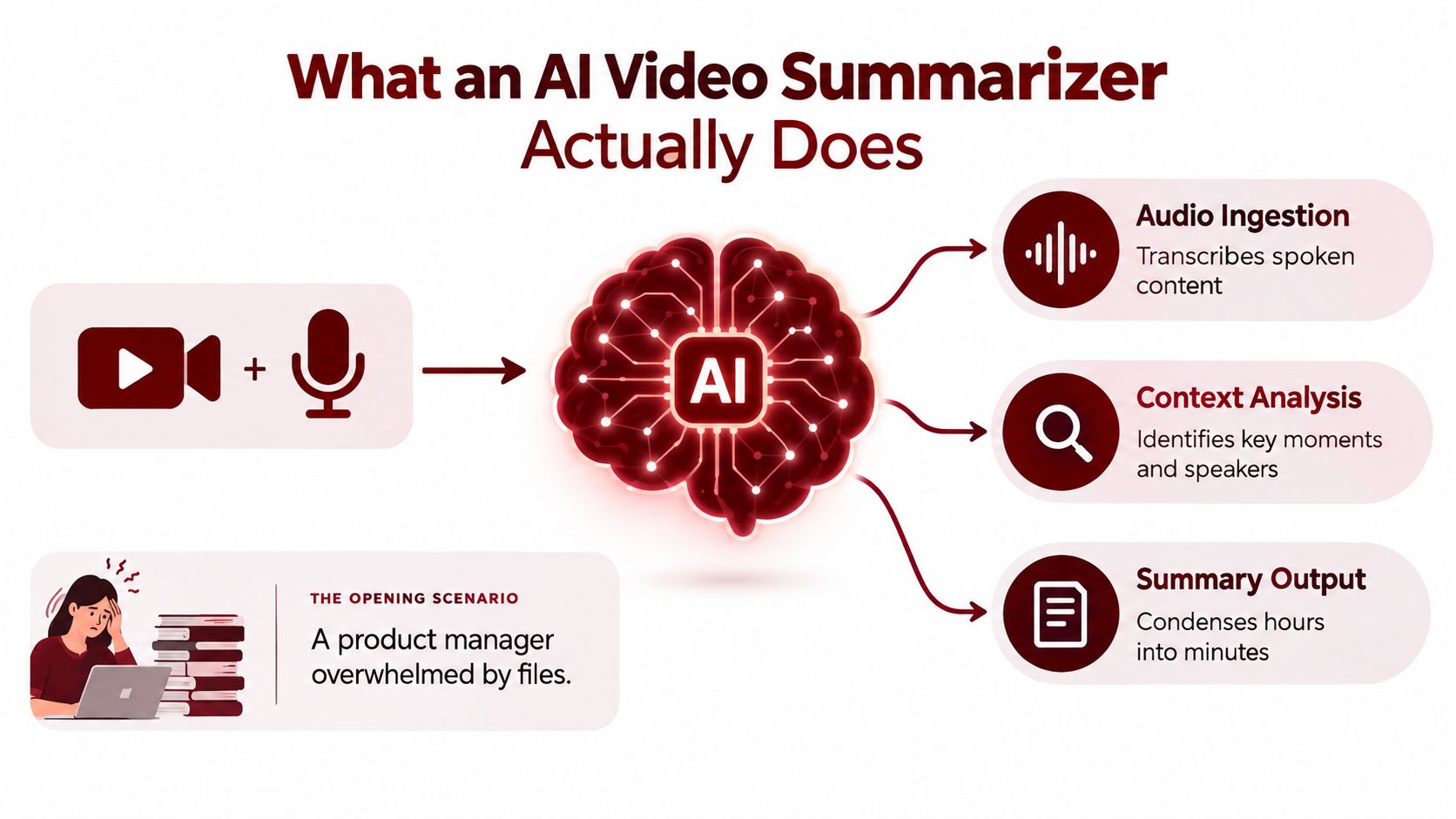
A product manager opens a folder containing recordings from user interviews. Each participant described frustrations, workarounds, and requests, but the most important insight may be buried in the middle of a conversation. Watching every recording from start to finish would be thorough, yet it would delay the decisions the team needs to make.
An AI video summarizer ingests a video or audio recording and returns a condensed representation of its content. That representation might be a written abstract, a bullet-point brief, a list of timestamped highlights, chapter markers, a short clip reel, or a question-and-answer document. The output depends on the tool, the source, and the instructions you provide.
The distinction between summarization and transcription matters. A transcript tries to preserve what people said, usually as faithfully as possible. Captions make spoken content readable during playback. A video editor cuts and arranges media. Summarization goes one step further by deciding which information deserves emphasis and compressing the meaning into a shorter form.
The input and output contract
Think of the tool as a research assistant with a specific contract. You provide a recording, and it attempts to identify speech, speakers, scenes, topics, and significant moments. It then converts those signals into an output designed for a particular use.
A meeting recap might emphasize decisions, owners, and unresolved questions. A lecture summary might organize concepts by topic. A social-media workflow might identify short, self-contained moments suitable for clips. A research workflow might collect repeated complaints across multiple interviews rather than summarize each recording separately.
Practical rule: Choose the output before choosing the tool. A readable summary, a navigable video, and a publishable clip are different deliverables.
The system doesn't understand every recording in the same way a human does. It estimates importance from language, timing, repetition, visual changes, and the requested format. A polished paragraph can therefore hide a weak source transcript, a missed slide, or a wrongly attributed statement.
That boundary should shape expectations. An AI video summarizer is excellent at reducing the amount of material you need to inspect. It isn't a replacement for reviewing sensitive claims, complex disagreements, or anything that will be published without human editing.
How an AI Video Summarizer Works Step by Step
The simplest analogy is a library assembly line. Raw footage arrives as a box of mixed media. The system catalogs the files, separates the useful signals, creates notes, groups related material, ranks likely highlights, and prepares a readable index.
Step one, ingest and decode
The system first receives a file or a supported media link. It reads the video container, separates audio and video streams, and decodes frames so later components can inspect them. A long recording may contain silence, music, slides, camera changes, screen shares, and several speakers, so the tool needs a consistent internal timeline before it can summarize anything.
This stage can expose basic problems early. Unsupported formats, damaged files, variable frame rates, or inaccessible links may stop the workflow before language analysis begins.
Step two, prepare the audio
Audio preprocessing may reduce background noise, detect silence, separate channels, or prepare the signal for speech recognition. The system may also attempt speaker diarization, which assigns sections of speech to different voices. Diarization works best when voices are distinct, but overlapping speakers can cause the labels to drift.
Step three, create a transcript
An automatic speech-recognition system converts spoken audio into text. Whisper-class systems and comparable speech models can handle ordinary conversation, but recognition quality changes with microphone quality, accents, jargon, music, and crosstalk.
The transcript usually carries timestamps. Those timestamps become the bridge between the written output and the original recording. Without that bridge, a summary may sound useful while giving the reader no practical way to verify it.
Step four, clean and segment the material
The system can normalize punctuation, remove obvious filler, identify topic changes, and divide the recording into sections. Video-aware systems may also detect shot boundaries, slide transitions, or changes in on-screen content. A transcript-driven system may segment by paragraphs, pauses, or semantic similarity instead.
Step five, analyze importance
The summarizer scores sections according to signals such as key phrases, named entities, repetition, speaker emphasis, topic relevance, and proximity to a requested question. Extractive methods select existing sentences or moments. Abstractive methods generate new wording that represents several source passages.
Newer multimodal systems combine visual and language signals. Research using BLIP-2 captions and CLIP-aligned visual-textual embeddings compared image-only, text-only, averaged, and concatenated features across established video datasets, showing why visible slide text and spoken language can complement each other. The multimodal summarization study is useful background for understanding this design choice.
Step six, render the result
Finally, the tool produces the requested format. It might return a paragraph, chapter list, transcript, subtitles, clips, or structured notes. This stage also aligns headings and claims with timestamps, which is where apparently small errors can become operationally serious.
You can inspect a transcript independently with a YouTube transcript downloader when the main question is what was said rather than how the entire video should be condensed.
Latency, processing cost, and error risk don't come from one component. Speech recognition may dominate difficult recordings, visual analysis adds work when slides and scenes matter, and long-context generation becomes harder as the transcript grows. Vendor claims make more sense when you ask which stages they run, which they skip, and how they preserve source timestamps.
Types of AI Video Summarizers and Output Formats
Two tools can both advertise summarization while solving different problems. One may select the most important moments from a recording. Another may rewrite the full transcript into a coherent brief. Neither approach is automatically superior.
Extractive summarization keeps source wording or selects source clips. It tends to be easier to verify because the output points directly to material that exists. It can sound fragmented, however, especially when the selected passages came from separate parts of a discussion.
Abstractive summarization writes a new explanation. It can combine related ideas and produce a smoother brief, but it introduces a greater need for fact checking. If the underlying transcript is wrong, the generated prose can make the error sound more confident.
A third distinction is intent. A generic summary answers, “What is this video about?” A query-focused summary answers, “What did the speaker say about pricing?” A multi-video rollup compares several recordings, which is useful for research but requires consistent segmentation and source tracking.
| Approach | Typical Output | Best Fit For |
|---|---|---|
| Extractive | Selected sentences, clips, or highlights | Verification, archival review, and source-faithful notes |
| Abstractive | Rewritten brief with themes and takeaways | Executive recaps, study notes, and content drafts |
| Query-focused | Answers tied to a question or topic | Research, sales calls, and support investigations |
| Generic | Overview of the whole recording | First-pass orientation and content discovery |
| Multi-video | Combined themes across recordings | Interview synthesis and research comparison |
Match the format to the reader
A short text abstract is fast to read, but it can hide the reasoning behind the selection. A structured bullet brief works well for meetings because readers can scan decisions, risks, and next steps. Timestamped highlights are stronger when the viewer needs to inspect the original rather than trust a rewrite.
Auto-generated chapters make long recordings navigable. They're valuable for lectures, webinars, and tutorials where the user may want to jump directly to a topic. Short-form clips suit social distribution, but clip selection also requires attention to context, framing, captions, and rights. Q&A pairs are useful for knowledge bases, yet they can misrepresent a nuanced answer if the question removes important conditions.
The best choice is often a hybrid. A research team may need a concise overview, a topic list, and clickable source moments. A creator may need a transcript, candidate clips, and editable captions. A video-to-text summarization workflow can help when the intended deliverable is written content rather than an edited video.
How AI Video Summarizers Are Evaluated
An evaluation score doesn't tell you whether a summary is safe to share. It tells you how closely an output matches a chosen reference under a chosen measurement method.
Researchers commonly evaluate systems at three levels. Automated metrics compare generated summaries with human references. Human reviewers judge clarity, relevance, coherence, and preference. Task-grounded checks ask whether the output preserves facts, attributes claims correctly, and helps a person complete a real job.
Traditional video summarization often uses SumMe and TVSum. SumMe contains 25 personal videos collected from YouTube, while TVSum provides importance annotations every 2 seconds, according to the field overview linked in the video summarization research review. These datasets have helped researchers compare temporal selection methods, but they don't represent every production environment.
The benchmark illusion
A benchmark can reward a model for selecting segments that resemble reference annotations without proving that the result is useful to a customer. The standard metric is often F1 overlap between generated selections and human references. That primarily measures temporal selection, not whether a generated explanation is accurate or easy to use.
SumMe includes 15 to 18 human reference summaries per video, while TVSum uses importance scores from multiple annotators, as described in this benchmark analysis. Differences in annotation style can punish a valid summary that chooses different, yet defensible, moments.
Short or curated clips can also hide production problems. They may contain cleaner audio, fewer interruptions, and more obvious topic boundaries than a customer call or a conference recording. A model can perform well offline and still lose the thread when speakers interrupt one another or a key point appears on a slide instead of in speech.
| Benchmark | Content Type | Typical Length | Known Blind Spot |
|---|---|---|---|
| SumMe | Personal and lifestyle videos | Variable | Reference selections may not reflect business recordings |
| TVSum | Annotated online videos | Variable | Importance scores don't fully measure factual summaries |
| QMSum | Meeting-style, query-focused content | Variable | Question framing can simplify messy discussions |
| How2 | Instructional video and speech | Variable | Instructional structure may not reflect spontaneous dialogue |
| Charades | Action-focused video | Variable | Visual action recognition isn't the same as language summarization |
A serious 2026 evaluation should combine paired human preference tests, faithfulness review, source-linked claims, and side-by-side time savings on real customer videos. The important question isn't only whether a model selects the same moments as an annotator. It's whether a user can understand the result, verify it, and act without being misled.
How Scribiz Can Help
Scribiz is a web and Mac tool for extracting context from video and audio. It can generate transcripts, read on-screen text, and produce summaries and chapter lists from links or uploaded files. That combination matters when a recording's meaning lives partly in spoken language and partly in slides, code, captions, or other visible material.
The workflow supports YouTube links, direct media links, podcast feeds, and uploads. It can transcribe videos without captions, create SRT, VTT, TXT, Markdown, or JSON files, and produce clickable timestamps for summaries and chapters. Audio workflows can include speakers and timestamps, while video analysis can capture scene changes and screen text.

Where it fits
For a researcher, the value is source navigation. For a student, it's a transcript and chapter structure that makes dense material easier to review. For a media team, subtitle exports and timestamped notes can feed an editing workflow. For a developer or operations team, the API, CLI, and MCP server expose structured outputs for downstream tools and agents.
Scribiz also offers Auto, Listen, Watch, and Both modes, so the processing choice can match the source. The Mac app is designed to avoid full uploads, with only audio or a small low-resolution copy for Watch leaving the device. The service states that media is deleted when a job ends, while results expire after 24 hours, or after 30 days with an account.
That makes Scribiz a reasonable fit when you need more than a generic paragraph, especially if you want transcripts, on-screen text, chapters, timestamps, and exportable structure in one workflow. It's less appropriate to treat any automated output as publication-ready without checking the source, particularly for sensitive or high-stakes recordings.
If you're comparing options, start with the AI video summarizer from Scribiz and test it against the exact type of material you process, including recordings with slides, multiple speakers, and imperfect audio.
Real World Use Cases Across Industries
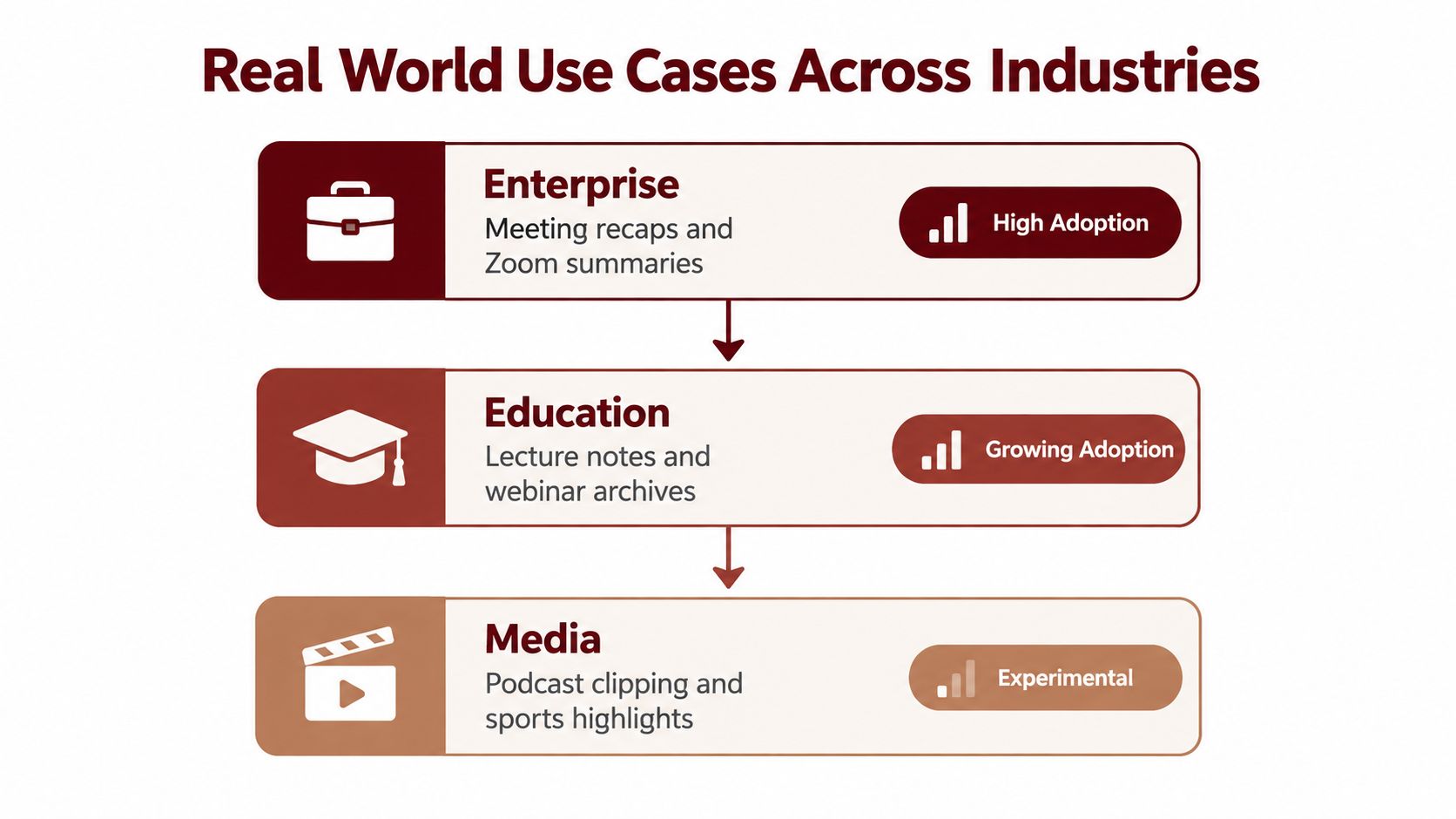
The most mature use cases have a simple input, a clear output, and a user who already knows what “useful” looks like. A meeting recording can become a recap. A lecture can become study notes. A podcast can become candidate clips and a searchable transcript.
Established workflows
Meeting and video-call summaries are mature because the desired fields are predictable: decisions, action items, open questions, and participants. Calendar connections, workspace storage, and task-management integrations make the output useful without asking people to copy and paste it manually.
Lecture and webinar notes follow a similar pattern. The input may be a recording with slides, and the expected output is a transcript, topic outline, chapter list, and study brief. An LMS or knowledge base can store those artifacts for later search.
Podcast clipping and news or sports highlights are also practical, though the final edit still needs human judgment. An RSS feed, media library, or clip editor can connect the source to a workflow that creates candidate moments rather than publishing every automated selection.
Growing applications
Sales teams can use customer-call summaries for coaching, follow-up drafts, and CRM notes. The production requirement is stricter than a casual recap. Speaker attribution, clickable timestamps, and an editable review step help prevent a tentative customer comment from becoming a false commitment in the record.
UX researchers can apply summarization across interviews, but synthesis is harder than summarizing one conversation. The system needs to preserve which participant made each observation and distinguish repeated patterns from one unusual comment. A research repository can then connect themes back to individual recordings.
Medical education, legal review, and internal training can benefit from searchable transcripts and chapter navigation, yet these settings demand stronger governance. The tool should support controlled access, source verification, and a clear retention policy before teams upload confidential material.
Experimental territory
Real-time livestream monitoring, documentary storyboarding, automated creator monetization clips, and combined caption-plus-summary accessibility packages remain more demanding. They require low latency, stable context, rights-aware editing, and reliable handling of visual information.
A production-grade workflow should meet three conditions:
- Source traceability: Every important claim links back to a timestamp or visible transcript.
- Speaker clarity: The system separates voices or marks uncertainty rather than presenting attribution as certain.
- Human control: Editors can change the output before it reaches customers, students, executives, or the public.
The headline question, “How accurate is it?” is too broad. Ask instead whether it remains useful when the audio is imperfect, the topic is specialized, and the summary must withstand review.
Where AI Video Summarizers Break Down
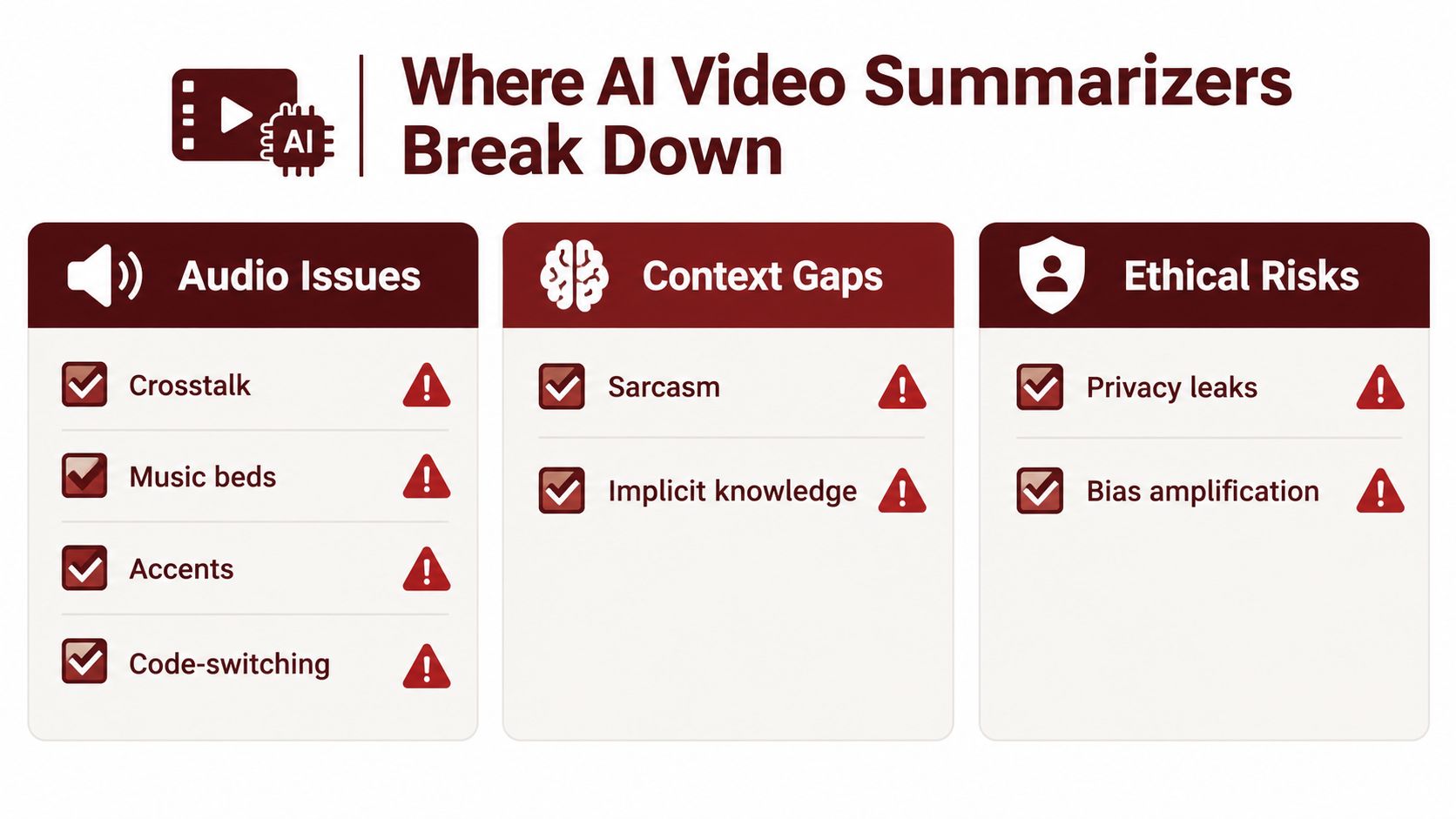
A clean demo usually contains one speaker, clear audio, an obvious topic, and a recording that starts and ends neatly. Real footage is less cooperative. Crosstalk, music beds, accents, and jargon can damage the transcript before the summarization model has a chance to reason about it.
Product documentation and industry guidance acknowledge this pattern. Clean single-speaker audio generally produces fewer transcription errors, while noisy multi-speaker recordings, muffled audio, heavy accents, and niche jargon can reduce output quality, as described in the AI video summarizer reliability guidance.
The transcript isn't the whole scene
A transcript may miss the chart that changes the meaning of a spoken claim, the code shown on screen, or a gesture that signals disagreement. Sarcasm can become a literal statement. A debate can collapse into a neutral paragraph that gives neither side proper weight.
Structural errors are just as subtle. A summary may average across the entire recording, give too much space to the opening, or bury the decision that appeared near the end. An abstractive system may also produce a polished sentence that no speaker said.
Use this short audit before sharing an output:
- Check claims: Open the source timestamp for every consequential statement.
- Check attribution: Confirm that the named speaker said the words assigned to them.
- Check omissions: Look for decisions, objections, caveats, and visual evidence missing from the brief.
- Check uncertainty: Treat unclear audio and ambiguous speaker labels as unresolved.
- Check editability: Review and revise the summary before sending it downstream.
A transcript and timestamped source path turn a summary into an auditable working document. Without them, you're asking readers to trust a compressed interpretation they can't inspect.
For multilingual or subtitle-heavy workflows, a YouTube subtitle translator with voice support can address a related accessibility need, but translation doesn't remove the need to verify the original meaning.
Privacy, Retention, and Compliance Considerations
Privacy shouldn't be a decorative paragraph on a product page. A recorded customer call, classroom discussion, employee interview, or clinical presentation may contain information that the uploader has no right to send to an unknown processing service.
Start with the data lifecycle. Ask whether the vendor stores the original video, the extracted audio, the transcript, embeddings, and the generated summary. These are separate artifacts, and deleting one doesn't necessarily explain what happens to the others.
Questions for a vendor
Before uploading sensitive footage, ask:
- Training use: Are uploads used for model improvement by default, or is customer content excluded?
- Retention: How long do raw files, transcripts, and summaries remain available?
- Deletion: Does deletion happen immediately, or does the request enter a later process?
- Location: Where does processing occur, and can the organization select a region?
- Access: Which employees, subprocessors, or integrations can access the material?
- Controls: Can an administrator manage users, exports, permissions, and audit records?
Some services say content is used only to provide summarization. Others describe temporary storage for processing or system improvement. Some online tools say they don't retain files unless users save them. This fragmentation is why a generic privacy promise isn't enough.
The market context makes the issue more urgent. One report projects the video content summarization segment to grow from $2.16 billion in 2025 to $2.69 billion in 2026, with a 24.6% CAGR, while identifying real-time indexing, personalized summaries, and edge processing as trends. The industry guide on video AI summarization provides that projection and also illustrates why more organizations are considering these workflows.
Compliance is a workflow question
GDPR, HIPAA, FERPA, client confidentiality, and employment obligations may apply depending on the recording and jurisdiction. Don't assume that encryption at rest means the vendor never stores the data. Encryption protects stored data from some access risks, but it doesn't answer how long the provider keeps it or whether a model-training process can use it.
For makers, publish a plain-language retention statement, document subprocessors, provide deletion controls, and separate optional improvement programs from the core service. For buyers, get those answers in writing before uploading material that would create a problem if it appeared in an internal transcript, support ticket, or model log.
Building, Launching, and Marketing an AI Video Summarizer
A small team shouldn't begin by training a video foundation model. Start with a narrow job, a reliable input path, and an output that a specific user can verify.
Build the smallest useful pipeline
A sensible first version can combine hosted speech recognition with an LLM for structured summaries. Add timestamp preservation from the start. If the product can't point a reader back to the source, later improvements in wording won't fix its trust problem.
Choose the visual strategy according to the job. A transcript-only product may suit meetings and podcasts where speech carries the information. Keyframe extraction becomes more valuable for lectures, demos, and presentations where screens matter. A multimodal model earns its cost when slides, charts, code, or visual actions materially change the interpretation.
Avoid building every feature simultaneously. A focused first release might offer:
- One ingestion path: Start with uploads or one video platform rather than every social network.
- One primary output: Pick a chaptered brief, research notes, or meeting recap.
- One verification loop: Make timestamps clickable and show the supporting transcript.
- One export route: Support the document or subtitle format the target user already uses.
Long recordings create an obvious cost curve when APIs charge for processing or language-model context. Chunking, deduplication, hierarchical summaries, and cached transcripts can control that burden. Shot detection can improve visual understanding, but it also adds processing overhead. Hallucinated timestamps are especially damaging, so test them as a separate quality metric rather than assuming they inherit transcript accuracy.
Launch around a job, not a model
The category is commercially meaningful. One industry report values the global AI video summarization market at $2.8 billion in 2025 and projects $18.6 billion by 2034, implying a 23.4% compound annual growth rate from 2026 through 2034. The same report assigns 63.5% of 2025 revenue to software solutions and 47.3% to enterprises, which points makers toward business workflows rather than consumer novelty alone. The AI video summarization market report contains those figures.
That doesn't mean a new product should target everyone. Pick a buyer with a recurring recording problem. “Summarize Zoom recordings for distributed product teams” is easier to explain and test than “understand all video.”
Distribution should follow the audience. Demonstrate real outputs in short videos. Publish pages for specific searches such as “summarize a Zoom recording” or “turn a webinar into chapters.” Work with podcast editors, course creators, researchers, or sales operations teams who can expose failure cases quickly. Launch communities and product directories can provide early feedback, but the product page should show the workflow, output, privacy behavior, and source verification clearly.
Compete on trust and fit
Accuracy is difficult to own as a positioning claim because buyers experience it differently across audio conditions and domains. A stronger position may focus on timestamped evidence, predictable retention, a specialized output format, or a workflow that removes manual copying.
For SEO, build content around the questions users ask before uploading: whether captions are required, how speaker labels work, how slides are read, what happens to files, and how to verify a summary. Each page should demonstrate the answer with an interface, a sample transcript, or a documented limitation. That approach attracts readers who are closer to a decision than broad claims about artificial intelligence.
A maker can also submit the product to Sidehunt, a weekly launch platform where indie products receive a project page and compete for visibility through community votes. Treat that as one distribution channel, not a substitute for product research. The durable advantage comes from matching a real recording workflow with an output people can trust.
If you're choosing an AI video summarizer, test it on the recordings you handle, including overlapping voices, slides, jargon, and sensitive content. Compare the transcript, timestamps, summary, export formats, and retention policy side by side. For a practical starting point, try Scribiz with a real video or audio file, inspect the linked source moments, and keep only the workflow that saves time without hiding uncertainty.